
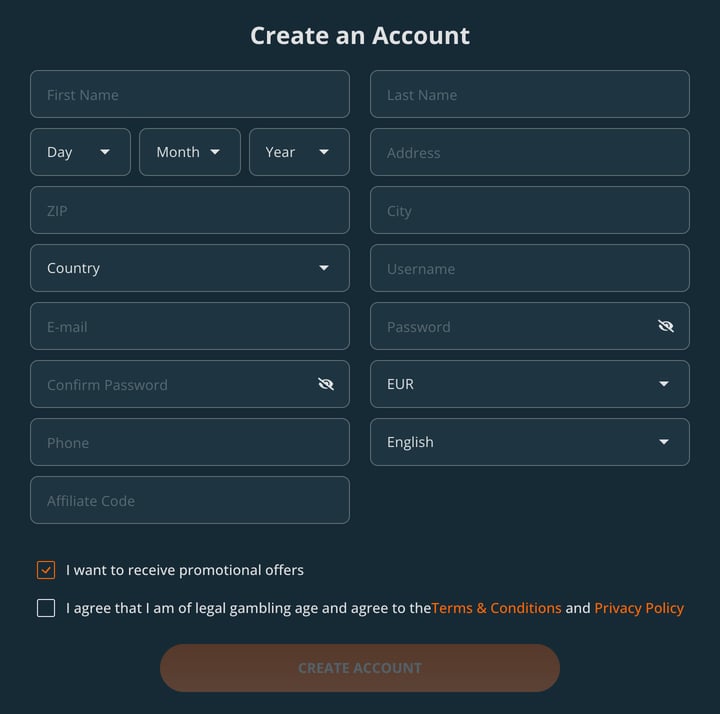
How to Sign up at LocoWin Step by Step
Opening a LocoWin account takes 4 steps in a single form. Keep your ID and full address to hand: whatever you enter is later checked against your documents.
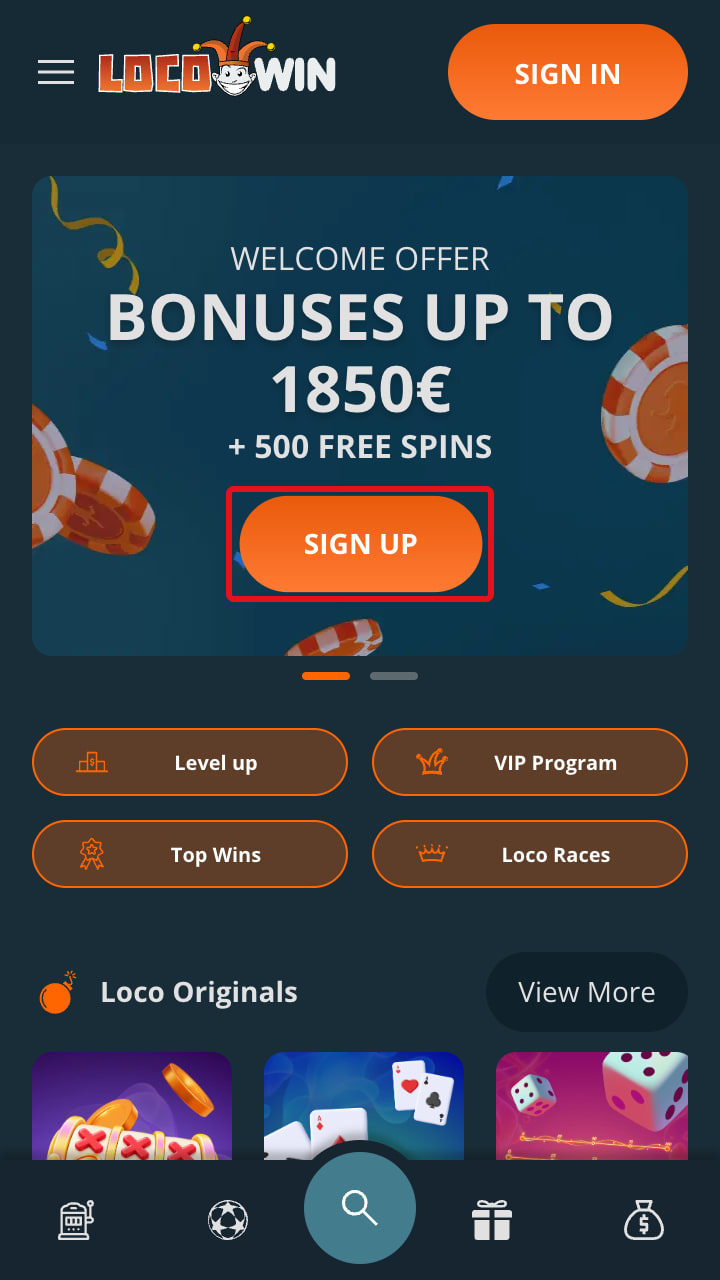 Tap “Sign up”. It's in the welcome banner on the home page. “Sign in”, at the top right, is for players who already have an account.
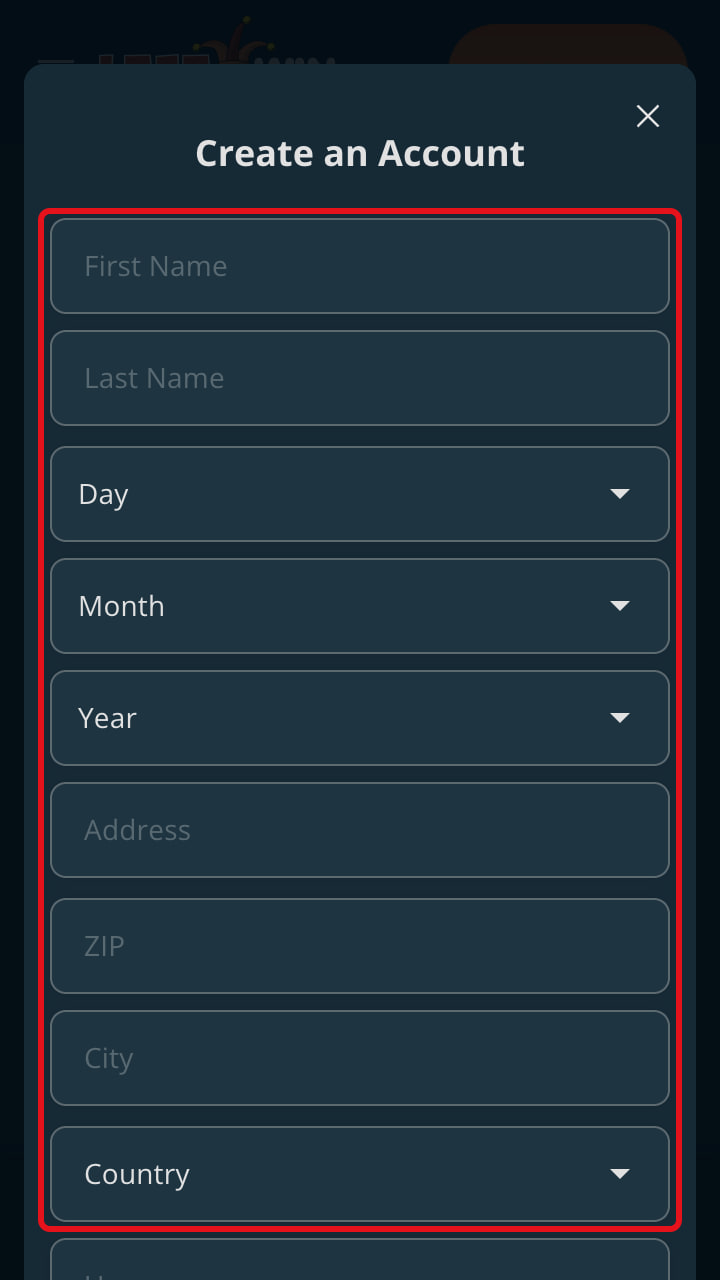 Enter your name, date of birth and address. First and last name exactly as on your ID or passport, the date in three drop-downs (day, month, year), then your address, ZIP (postal code), city and country, just as they appear on your bills.
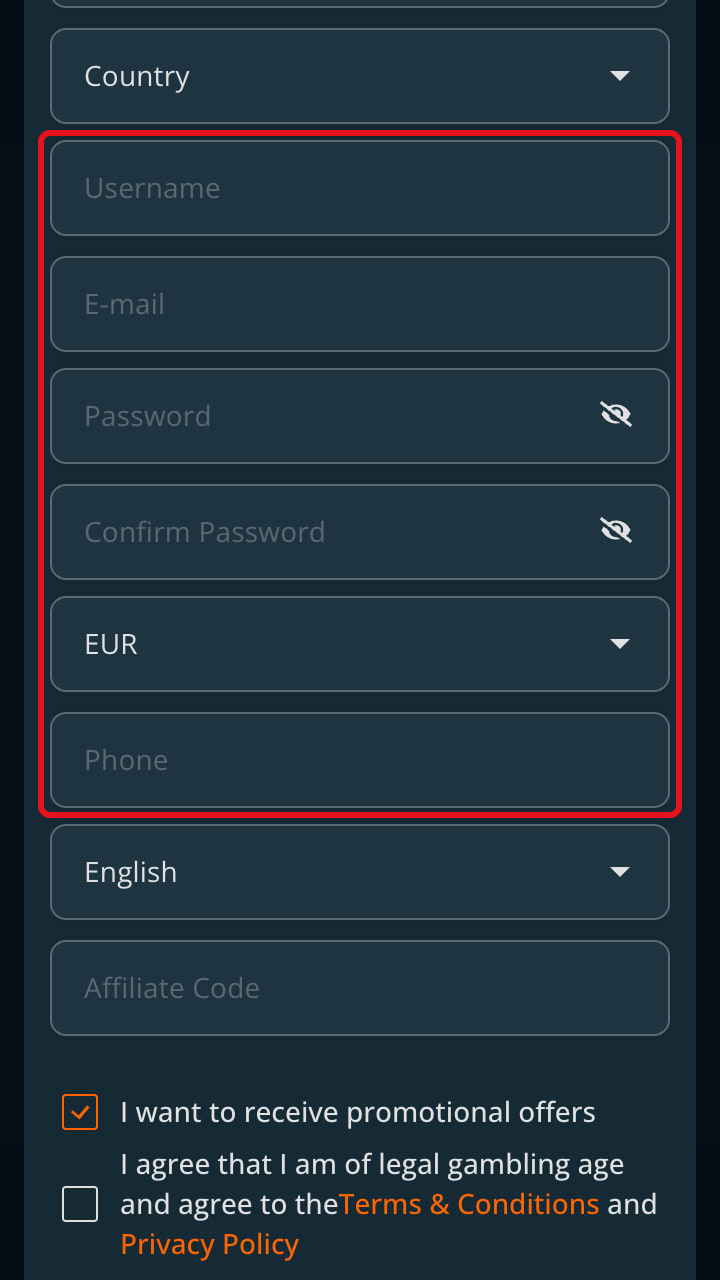 Create your login details. Username, email and the password twice. Leave the currency on EUR and add your mobile number in the Phone field.
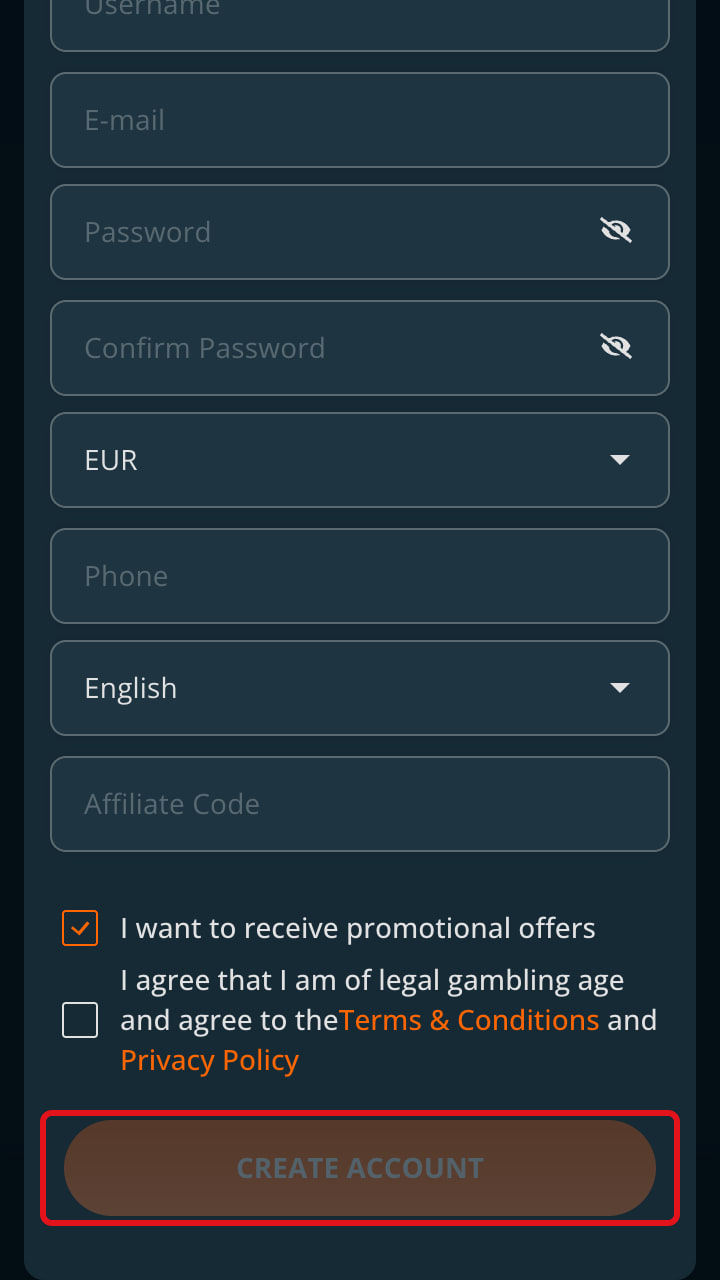 Tick the box and create the account. Leave the affiliate code blank if you don't have one, tick the legal age and terms box and tap “Create Account”.
Create your LocoWin account One form, no documents to start
Sign upWhat the Registration Form Asks for
The form has 15 fields and 2 checkboxes, and only the affiliate code is optional. Your name, date of birth and address must match your documents, and your email is what you use to reset your password.
| Block | Fields | What to keep in mind |
|---|---|---|
| Personal details | First name, last name, date of birth | As on your ID or passport; 18 or over |
| Address | Address, ZIP, city, country | Your country of residence and the address on your bills |
| Login | Username, email, password ×2 | A new password you don't use on other sites |
| Account | Currency, phone, language | EUR, your mobile number; English is preselected |
| Optional | Affiliate code | Can be left blank |
| Optional checkbox | “I want to receive promotional offers” | Up to you whether you receive promotions |
| Required checkbox | “I agree that I am of legal gambling age and agree to the Terms & Conditions and Privacy Policy” | The account isn't created without it |
The affiliate code is not a promo code: LocoWin doesn't use codes for its offers, and you tick the bonus in the cashier when you deposit.
Requirements for Opening a LocoWin Account
There are only a few conditions, and all of them are checked later during account verification.
- Minimum age
- 18
- Accounts per person
- 1
- Country
- Where you actually live
- Currency
- EUR
- Documents at sign-up
- None
- Deposit for the bonus
- From €20
- Real details. Your name, date of birth and address must match your ID and your bills.
- A permitted country. Residents of a number of restricted countries can't play at LocoWin, so choose your real country of residence.
- Payment methods in your own name. You may be asked for photos of the card you used, and withdrawals go back, where possible, to the method you deposited with.
Account Verification (KYC)
Verification confirms that you are the account holder and that payments come from your own funds. You send nothing when you sign up: LocoWin asks for documents later, and you upload them from the cashier.
| Document | What it must show | When |
|---|---|---|
| ID card, passport or driving licence | Name and date of birth clearly legible | When requested |
| Payment card | Front and back of the card you used | If you deposited by card |
| Electricity, water or gas bill | Your name and address, issued within the last 2 months | When requested |
| Source of funds | Where the money or wealth comes from | May be requested once deposits reach €2,000 |
- Sharp photos, with all 4 corners visible and no glare.
- Once your KYC status is verified, more payment methods may appear in the cashier.
How to Check Your Details in Your Profile
- Open “Personal Info”. It's the first tab in the cashier, next to Deposit, Withdraw and Transaction History.
- Switch to edit mode. The edit option is next to your account details, which also show your country and currency (EUR).
- Check your details. First name, last name and date of birth must match your ID; check your phone number and email too.
- Save your changes. The button at the bottom of the block updates your profile.
When Verification Is Requested
LocoWin may ask for documents at any time after you sign up, but you can upload them in advance in the cashier with “Upload ID” and “Upload Proof of Address”. That way you can withdraw your winnings with nothing pending; you don't need a verified account to get the welcome bonus.
First Deposit and Welcome Bonus
A deposit starts at €10, depending on the method, with no fees; casino bonuses need at least €20. With that first payment you choose one of the two welcome offers, which can't be combined.
- Open the cashier and choose a method. Tap “Deposit” at the top: Visa, Mastercard, bank transfer, Skrill, Neteller, MiFinity, Paysafecard, CASHlib or crypto.
- Enter the amount and tick the bonus. It appears under “Select your bonus”; there's no code to type.
- Confirm the deposit. The balance is credited and the bonus you ticked becomes active for slots.
| Condition | Casino bonus | Sports free bet |
|---|---|---|
| Amount | Up to €1,850 + 500 free spins | 100% of your first bet, up to €100 |
| How it works | A bonus on each of your first 5 deposits | Your 1st bet comes back as a free bet if it loses |
| Minimum deposit | €20 | €10 |
| Requirement | 36x the bonus (40x with the crypto bonus) | Stake from €10, minimum odds 1.50 and at least 3 selections |
| Time limit | 30 days | 30 days |
The welcome bonus can only be played on slots, with bets of up to €5 while it's active. Think about how you'll cash out as well: withdrawals are paid only by SEPA, Instant Bank Transfer or crypto.
A welcome bonus for your account Up to €1,850 + 500 free spins from €20
Get the bonus18+. Before your first deposit, set a daily, weekly or monthly deposit limit with the tools for responsible gambling: lowering it takes effect immediately, while raising or removing it takes 24 hours.
Signing up on Your Phone
On a phone, signing up works exactly as on a computer: open LocoWin in your browser, tap “Sign up” and fill in the same form. There's no native app or APK; the mobile app is a shortcut to the site on your home screen.
| Phone | Browser | Shortcut |
|---|---|---|
| Android | Chrome | ⋮ menu → “Add to Home screen” |
| iPhone | Safari | “Share” → “Add to Home Screen” |
Your phone's autofill may fill in your name or address with old details: check every field before you tap “Create Account”.
Common Sign-Up Errors
Almost every form error takes a moment to fix. If you already have an account, don't open another one: just log in with your username or request a new password with “Forgot your password?”.
| Problem | Fix |
|---|---|
| The username is already taken | Add numbers or combine your name with another word |
| The email is already registered | You already have an account: log in with your username or reset your password |
| The passwords don't match | Type the same password in both fields, with no trailing spaces |
| Your date of birth won't let you continue | Over-18s only; check the year you picked |
| The button doesn't create the account | A required field or the age and terms box is missing |
| Your details don't match your documents | Correct them under “Personal Info” or ask support for help |
Frequently Asked Questions About Signing up
How do I sign up at LocoWin?
Tap “Sign up”, fill in the form, tick the age and terms box and tap “Create Account”. You don't need any documents at this stage.
What documents do I need to verify my account?
An ID card, passport or driving licence, both sides of your payment card and a bill from the last 2 months showing your name and address. Once your deposits reach €2,000, you may also be asked for proof of the source of funds.
Is the affiliate code required?
No, it's an optional field. It isn't a promo code and the bonus doesn't depend on it: you choose the bonus in the cashier when you deposit.
Can I sign up from any country?
No. Residents of a number of restricted countries can't play at LocoWin, so pick your real country of residence in the form. Accounts are opened in euros (EUR).
Can I open more than one account?
No, only one account per person is allowed. If you've forgotten your login details, reset your password or contact support instead of signing up again.
Do I need a verified account to get the bonus?
No. You tick the bonus under “Select your bonus” when you deposit €20 or more, and documents are requested later.